If your goal is simply to slice images for an Instagram puzzle feed quickly without dealing with pixel calculations, you can use the free Dayverse Feed Splitter tool directly in your browser.
However, for those curious why modern puzzle feeds require specialized margin compensations to prevent misalignments on the Instagram profile grid, this article provides an in-depth exploration of interface geometry, analytical formula derivations, and visual continuity proofs.
Two Conflicting Interface Realities
To understand the core problem, one must recognize that Instagram presents identical images through two distinct viewing modes, each with conflicting geometric requirements.
The first view is the standard timeline or home feed, where users scroll past posts individually. In this mode, photos are displayed uncropped in their native portrait format with standard dimensions of pixels. Viewers can appreciate the entire composition from the far left boundary to the far right boundary.
The second view is the profile grid, where posts are tiled into a three-column thumbnail layout. On this profile page, the Instagram user interface does not display the full image. Instead, it applies an automatic horizontal crop to the left and right margins to fit the narrower grid cells.
The central design challenge in modern puzzle feeds is reconciling these two competing display formats. Every individual post must look balanced and visually coherent when viewed alone in the home feed, while simultaneously aligning with neighboring posts across the profile grid without any visible seam gaps.
Evolution of Instagram Grid Geometry Over Time
In the early architecture of Instagram, grid layouts were uniform and mathematically simple. Every post adhered to a standard square format with a aspect ratio measuring at pixels, yielding an individual aspect ratio :
During that era, the profile grid also displayed square thumbnails without cropping side margins. As a result, calculating the canvas dimensions for a single row containing horizontal columns was a simple linear multiplication.
The total canvas width and global aspect ratio were defined by:
Slicing on a square grid was achieved by dividing a pixel canvas sequentially at coordinates , , and . No overlap compensation was necessary because the right boundary of the first tile matched the left boundary of the adjacent tile.
Complexity emerged when Instagram transitioned to vertical portrait photos with a aspect ratio ( and ) as the primary feed format, where:
This change in individual post proportions completely altered the geometry of puzzle feed canvases.
Why Standard Slicing Loses 68 Pixels of Image Data
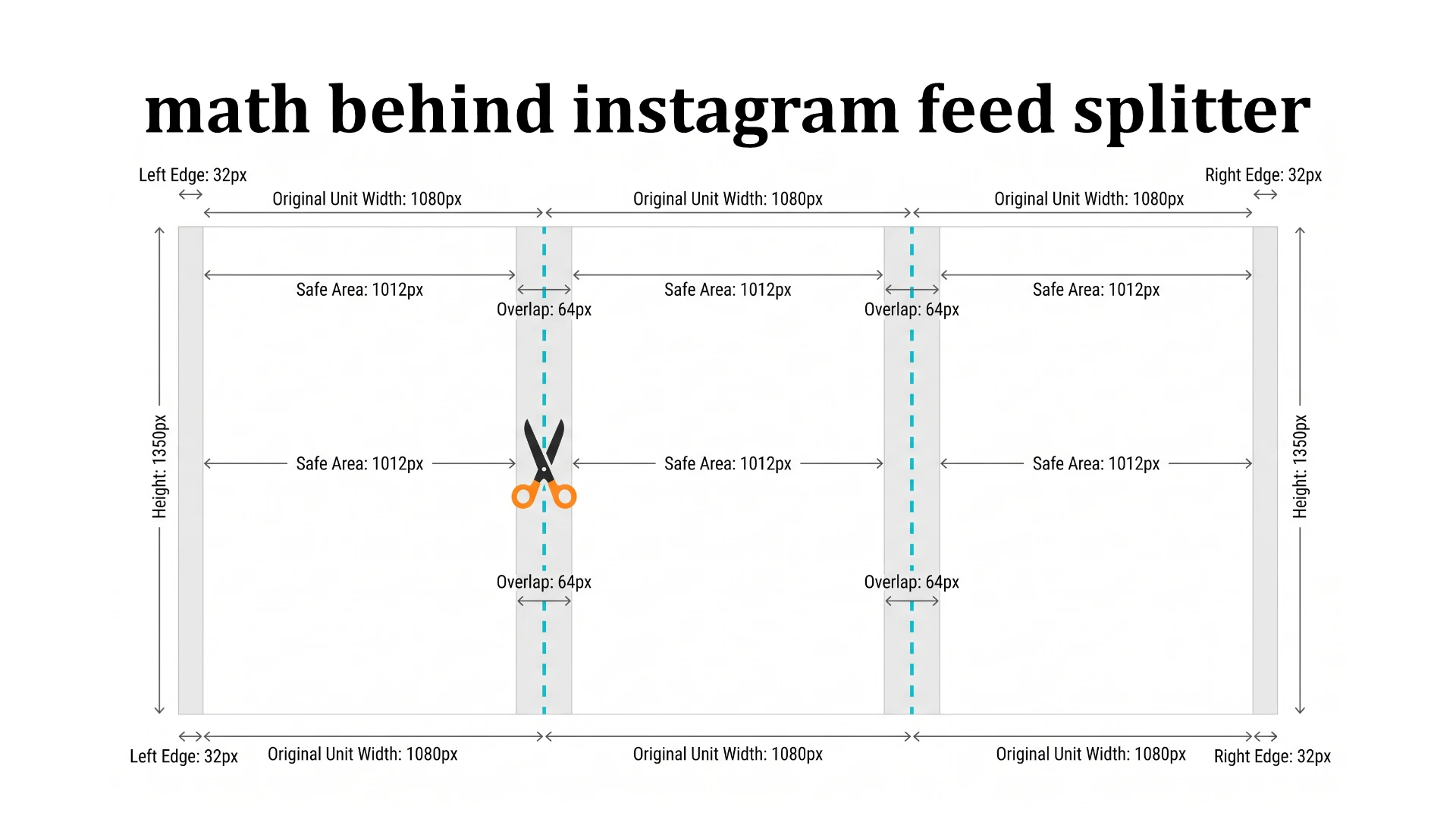
When a pixel portrait post is rendered inside the three-column profile grid, Instagram only displays the central portion measuring in width. This central pixel wide area is known as the safe area or guide area.
Because the full post measures , the Instagram user interface crops a symmetric margin from both sides of each image:
Now consider what happens when a designer slices a panorama into three side-by-side tiles without accounting for this symmetric crop.
Suppose a canvas is split into two adjacent columns, Column A spanning pixels and Column B spanning pixels . Once published to Instagram:
- Column A is cropped by on the left and on the right, leaving a visible window on the profile grid of .
- Column B is also cropped by on the left and on the right, leaving a visible window on the profile grid of .
Notice the gap between the end of Column A and the start of Column B. The distance between pixel and pixel is exactly:
These pixels represent visual information that disappears into the interface void. If a person face is positioned across the seam, facial features will appear partially erased. If text spans the boundary, letters will be sliced in half.
To prevent this pixel data loss, designers must apply overlap compensation. Each tile must intentionally capture a margin from its neighboring column.
The overlap ratio relative to the full post width is defined by the mathematical constant :
Mathematical Proof of Visual Window Continuity
How can we prove that an overlap compensation of guarantees a seamless image across the profile grid with zero missing or duplicated pixels? We can prove this using one-dimensional coordinate intervals.
Consider a reference canvas width for columns and seam boundaries:
We divide this reference canvas into three individual files with column indices , each having width . The origin coordinate on the source image shifts by multiples of .
The slicing interval on the source image for column , denoted as , is defined by:
Evaluating the pixel span for each file yields:
- Column
- Column
- Column
Notice that Column 0 and Column 1 overlap over the interval across a width of pixels. Similarly, Column 1 and Column 2 overlap over the interval across a width of pixels.
Next, let us compute the visible window displayed on the Instagram profile grid after the symmetric margin is cropped from each side:
Evaluating each column produces the following visible intervals:
- Column with an effective width of
- Column with an effective width of
- Column with an effective width of
Analyzing the boundary intersection points reveals:
The right edge of Column 0 lands precisely at pixel , and the left edge of Column 1 begins at pixel . Similarly, the right edge of Column 1 lands at pixel , and the left edge of Column 2 begins at pixel .
The union of all three visible windows forms a continuous interval:
The total image width visible on the profile grid is , which exactly equals , while the overlap measure between visible windows is zero.
This proves mathematically that an overlap compensation of creates a continuous visual partition across the profile grid without a single duplicated or omitted pixel.
Derivation of the Global Crop Box Aspect Ratio
For designers creating initial canvas templates in graphics software, a key question is determining the exact aspect ratio required for the master crop box.
We can derive the general aspect ratio formula as a function of the number of rows .
The reference canvas width is expressed in terms of and the overlap factor :
For a grid consisting of vertical rows, the reference canvas height is . The crop box aspect ratio is calculated by dividing width by height:
Substituting constants and :
The general equation for any row count is:
Aspect ratio values across common grid row configurations include:
- 1 row (, total 3 posts):
- 2 rows (, total 6 posts):
- 3 rows (, total 9 posts):
- 4 rows (, total 12 posts):
By locking this aspect ratio, the crop bounding box maintains precise geometric proportions regardless of the source image resolution.
Coordinate Mapping on High-Resolution Source Images
In production workflows, source images captured from professional cameras or 3D rendering engines often possess large dimensions such as pixels.
When a user defines the main crop rectangle on the source image with origin , crop width , and crop height , the slicing algorithm computes the coordinates for each tile without degrading source sharpness.
For each cell in row and column , tile parameters on the source image are calculated using the following relations.
Slice height on the source image ():
Slice width on the source image ():
Overlap magnitude on the source image ():
The origin coordinates for extracting each tile are defined by:
Each rectangular sub-domain is then mapped onto a target Canvas at pixels before being exported as a high-quality digital image file.
Matrix Permutations and Reverse Upload Order
An equally critical aspect of puzzle feeds is the posting sequence. Many creators calculate tile coordinates correctly but end up with a jumbled profile feed due to posting in the wrong order.
This occurs because the Instagram profile grid functions as a LIFO (Last In, First Out) queue. Every newly uploaded image is placed at the top-left position , pushing all existing posts one step to the right. When a post reaches the third column, it shifts down to the next row.
A puzzle feed of dimension is represented by the matrix of indices :
To ensure the final matrix configuration emerges correctly upon completion, the -th upload step () must follow the reverse permutation function :
The required publication sequence is:
- Step 1 (): upload the tile from the bottom-right cell .
- Step 2 (): upload the tile from the bottom-middle cell .
- Step 3 (): upload the tile from the bottom-left cell .
- Subsequent steps: move up one row and repeat from the right column to the left column.
- Final step (): upload the tile from the top-left cell .
Tile is uploaded last, landing directly at the top-left corner of the profile grid and locking the entire composition into place.
Design Composition Tips for Best Results
Alongside mathematical precision, several practical design strategies help achieve the best visual outcome:
- Keep key elements like focal faces, main headlines, and brand logos within the central safe area of each column to ensure they remain intact when viewed individually in the timeline.
- Use connecting visual elements such as vector accent lines, gradient sweeps, or large background shapes across column borders to emphasize the puzzle connection on the profile grid.
- Publish the entire series of posts in a single session without intervening posts to prevent shifting the matrix positions.
Summary
Behind a seamless Instagram puzzle feed lies an interconnected system of vertical aspect ratios, symmetric margin offsets , overlap factors , coordinate interval proofs, and LIFO upload queue permutations.
For creators looking to generate perfectly aligned slices without calculating formulas manually, the Dayverse Feed Splitter tool is available directly in your browser.