Video processing in the browser using FFmpeg.wasm often presents a puzzling scenario. Everything works as expected, yet performance falls short of expectations. Your laptop heats up, the fan spins loudly, and the CPU works at full capacity. Meanwhile, your monitoring tool reveals that the GPU sits nearly idle. This is frustrating when hardware encoders like NVENC or QuickSync are available on your GPU and should theoretically accelerate the encoding process.
FFmpeg.wasm appears to ignore the presence of these hardware acceleration capabilities. This isn’t due to a bug or misconfiguration. Rather, it’s a direct consequence of how WebAssembly is architecturally designed to operate within browsers.
The WebAssembly Sandbox Architecture and Its Limitations
WebAssembly is built on a single, rigorous security principle. Unlike traditional virtual machines or containers, WebAssembly employs a stricter, software-based isolation model. Every WebAssembly module lacks direct access to the host system’s memory. Instead, modules receive a continuous block of memory that is perfectly isolated from the host system. All operations within WebAssembly are relative to the beginning of this memory block, not to the physical memory addresses of the system.
The browser runtime performs boundary checks on every memory access to ensure no instruction strays outside the allocated memory range. This is an intentional trade-off between security and performance. WebAssembly modules are guaranteed unable to read passwords from your RAM, access your file system, or execute arbitrary system calls. The consequence is that WebAssembly modules have no direct pathway to communicate with any hardware on the host system—not the GPU, not video encoder hardware, not even the network interface.
WebAssembly’s security model begins with zero access. Unlike Docker containers, which start with full access and must be restricted, WebAssembly modules begin with no capabilities whatsoever. Modules can only interact with the outside world through functions provided by the JavaScript host, exported functions callable from the outside, or through the WebAssembly System Interface, a standard API for controlled access to resources. No system calls. No direct hardware access. No way out.
FFmpeg.wasm and Its Fundamental Limitations
FFmpeg.wasm is the result of transpiling FFmpeg’s C/C++ source code to WebAssembly using Emscripten. This process converts function calls, pointer arithmetic, and system calls into WebAssembly instructions that can run in browsers. What cannot be transpiled is direct hardware access for video encoding and decoding acceleration.
When native FFmpeg on an operating system performs H.264 video encoding, it can take two distinctly different paths. The software path uses a CPU encoder with low-level optimizations. When compiled to WebAssembly, these optimizations are transpiled into WebAssembly instructions, but the performance doesn’t compare to native code. Benchmarks show FFmpeg.wasm achieving around 40fps for 720p conversion, while native FFmpeg can reach 500fps on the same hardware.
The hardware path completely bypasses the CPU. Video frames are uploaded to GPU memory, and specialized hardware encoder chips perform compression using circuits specifically designed for H.264 or H.265 algorithms. No CPU instructions are executed for the encoding itself. FFmpeg.wasm cannot access this hardware path at all. The WebAssembly memory sandbox prevents the module from accessing GPU memory space, calling driver APIs, or executing system calls to hardware encoders. Consequently, FFmpeg.wasm is forced to use pure software encoding, running within the CPU JavaScript engine, inside the WebAssembly sandbox, with additional overhead on every memory access.
Layered Overhead That Destroys Performance
When FFmpeg.wasm runs, video frames pass through several stages, each with its own overhead. Files are loaded into JavaScript ArrayBuffer, then copied into WebAssembly memory. The FFmpeg decoder runs within WebAssembly with every pixel access passing through memory boundary checks. The encoder runs without access to native low-level optimizations. The encoded bitstream is copied from WebAssembly memory back to JavaScript for download. Not a single stage in this pipeline can be offloaded to a GPU hardware encoder.
WebCodecs API as the Official Path Forward
Browser vendors recognized this bottleneck. They couldn’t open the WebAssembly sandbox for direct hardware access—that would destroy the security model—but they provided a new JavaScript API with privileged access to hardware encoders. This API is called WebCodecs. Introduced in Chrome 94 in 2021, WebCodecs provides low-level access to VideoDecoder for hardware-accelerated video decoding, VideoEncoder for hardware-accelerated video encoding, AudioDecoder and AudioEncoder for audio codecs, and VideoFrame for direct access to decoded video frames.
The crucial point is that WebCodecs does not run inside the WebAssembly sandbox. It’s a native JavaScript API implemented directly in the browser engine with privileged access to system-level codec APIs. When video is decoded with WebCodecs, the browser calls OS codec APIs like VA-API on Linux, Video Toolbox on macOS, or Media Foundation on Windows. The encoded bitstream is uploaded to GPU memory. The hardware decoder performs decompression. Importantly, the decoded frame remains in GPU memory as a texture. JavaScript receives a handle to a VideoFrame that references this GPU memory. No copy from GPU to CPU. No sandbox overhead. Frames can be directly passed to Canvas rendering, WebGL shaders, or WebGPU compute pipelines.
Libraries Leveraging WebCodecs
Because the WebCodecs API is still relatively low-level and requires manual handling of container formats, audio/video track multiplexing, codec configuration, and compatibility checks, a library ecosystem has emerged to abstract away this complexity.
MediaBunny is a TypeScript library that consolidates reading capabilities for demultiplexing various container formats like MP4, MOV, WebM, MKV, WAV, MP3, FLAC, and others. It also provides writing for multiplexing video and audio into containers with flexible formats, and conversion that combines reading, WebCodecs-based decoding, WebCodecs-based encoding, and writing.
What distinguishes MediaBunny from FFmpeg.wasm is how it works under the hood. MediaBunny demultiplexes containers using a pure JavaScript parser that’s fast because it only parses metadata. It then decodes compressed packets using the hardware-accelerated WebCodecs VideoDecoder. It encodes decoded frames using the hardware-accelerated WebCodecs VideoEncoder. And it multiplexes encoded packets into a new container using fast, pure JavaScript. No WebAssembly sandbox. No CPU encoding. Everything runs on the same GPU video engine used by native video editor applications.
Before MediaBunny, developers used mp4-muxer and webm-muxer. Both are pure TypeScript libraries for writing MP4 and WebM containers. Both were designed to work seamlessly with WebCodecs. No WebAssembly intermediary. No CPU copying. Encoded chunks flow directly from the hardware encoder into the JavaScript muxer. MediaBunny is essentially an evolution and unification of mp4-muxer and webm-muxer with added reading, demuxing, and conversion capabilities.
The Dramatically Different Performance Picture
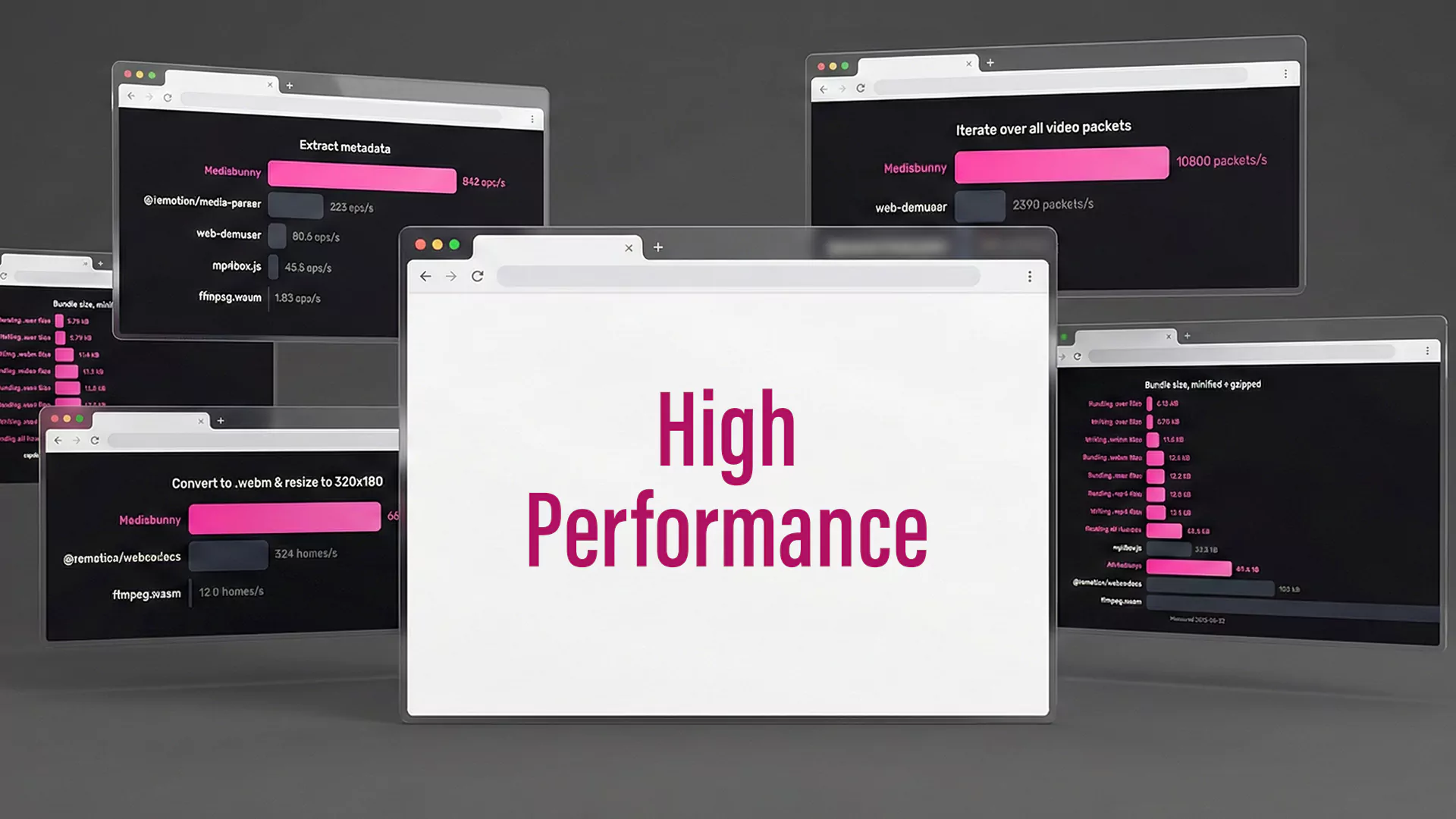
Benchmarks demonstrate remarkably significant differences. FFmpeg.wasm for 1080p H.264 encoding achieves around 25fps on a MacBook Pro 2018 with 100% CPU usage across all cores, 0% GPU usage, and over 2GB memory consumption. By contrast, WebCodecs with MediaBunny for the same 1080p H.264 encoding achieves around 200fps on identical hardware—eight times faster. CPU usage is only about 15%, used solely for JavaScript demuxing and muxing. GPU usage sits at about 40% on the video encoder engine, and memory usage stays below 500MB.
The difference becomes even more dramatic for 4K resolutions or modern codecs like H.265 or AV1, which are far more computationally intensive for software encoding.
When to Use Each Solution
FFmpeg.wasm still has its place. Use FFmpeg.wasm when you need codecs or formats unsupported by WebCodecs, such as ProRes, DNxHD, or exotic containers. Use it also if you need complex FFmpeg filters like colorspace conversion, deinterlacing, or intricate filter graphs. Cross-browser compatibility matters too—particularly for browsers not yet supporting WebCodecs, like Firefox, which still offers only partial support. Portability to non-browser environments like Node.js via WebAssembly is another consideration.
Use WebCodecs paired with MediaBunny when performance is your primary concern. When you’re working exclusively with widely-supported modern codecs like H.264, H.265, VP8, VP9, or AV1. When your target audience uses Chromium-based browsers like Chrome, Edge, or Opera. When you want efficient battery usage on mobile devices—hardware encoding is roughly ten times more power-efficient. Or when your application requires real-time video processing such as live streaming or video conferencing.
The Bottom Line
FFmpeg.wasm cannot use GPU acceleration not because of a bug or technical limitation in FFmpeg itself, but because of a fundamental design decision in WebAssembly’s security model. The sandbox that protects users from malicious code also prevents that code from accessing hardware acceleration that could dramatically improve performance.
Browser vendors have provided an alternative path through the WebCodecs API—a privileged JavaScript API with access to the same hardware encoders and decoders used by native applications. Libraries like MediaBunny, mp4-muxer, and webm-muxer have proven that by leveraging this path, browser-based video processing can achieve performance comparable to native desktop applications while maintaining the security sandbox that protects users.
When you experience 100% CPU spikes while using FFmpeg.wasm, this isn’t a configuration error. It’s an architectural limitation. The solution isn’t optimizing your FFmpeg.wasm configuration—it’s migrating to a WebCodecs-based pipeline for tasks that require hardware acceleration. CPU performance, battery consumption, and user experience will improve dramatically with this approach.
WebCodecs API is currently fully supported in Chromium-based browsers like Chrome 94+, Edge 94+, Safari 16.4+, and has partial support in Firefox. For production deployment, implement feature detection and fallback strategies.